Hexagonal Architecture
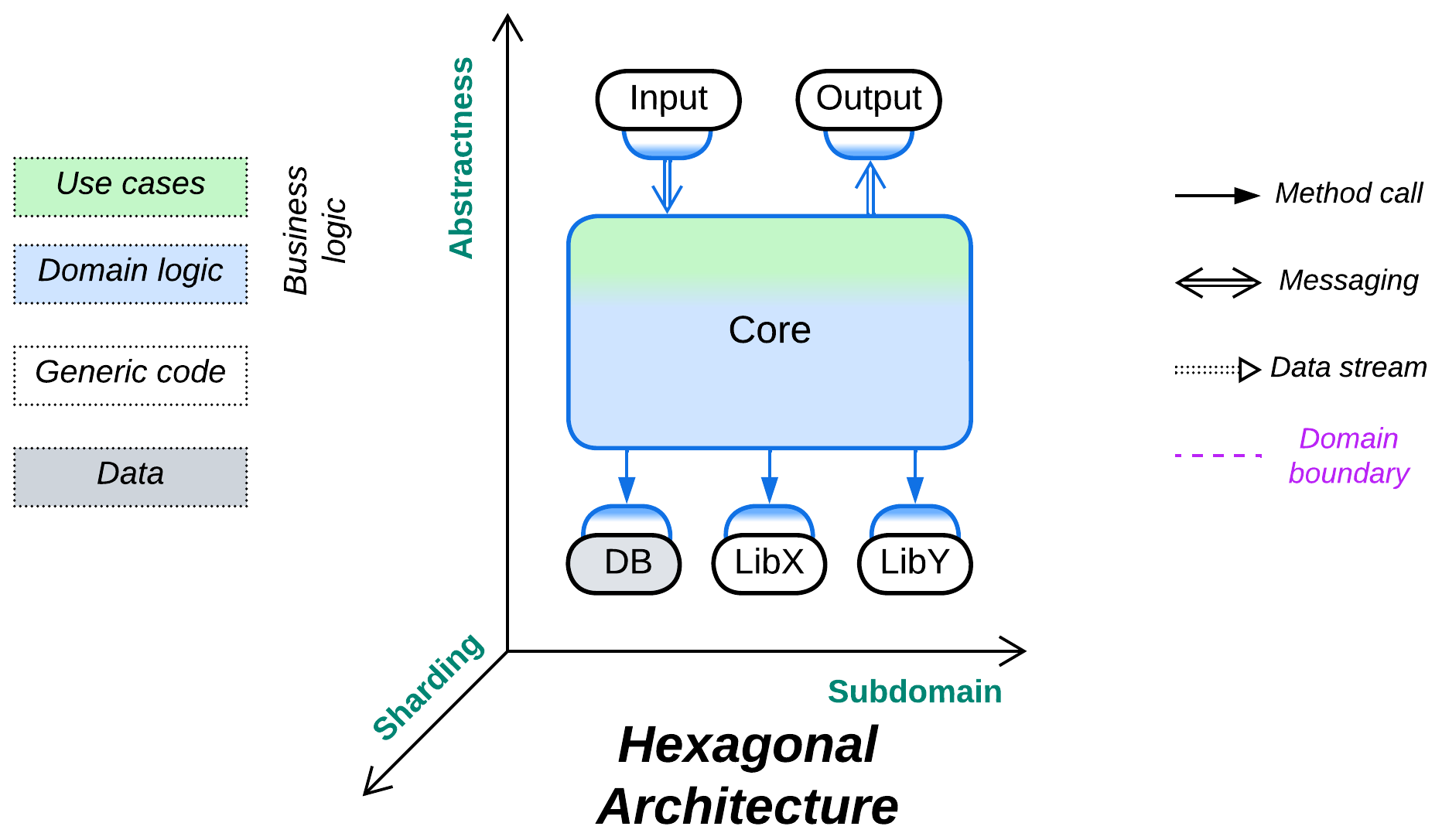
Trust no one. Protect your code from external dependencies.
Known as: Hexagonal Architecture, or originally as Ports and Adapters.
Structure: Monolithic or subdivided business logic extended with a set of (adapter, component) pairs that encapsulate external dependencies.
Type: Implementation.
| Benefits | Drawbacks |
|---|---|
| Isolates business logic from external dependencies which thus become expendable | Suboptimal performance |
| The programmers of business logic don’t need to learn any external technologies | The vendor-independent interfaces must be designed before the start of development |
| Facilitates the use of stubs/mocks for testing and development | |
| Allows for qualities to vary between the external components and the business logic |
References: Herberto Graça’s chronicles is the main overview of patterns in this chapter. For Hexagonal Architecture there is the original article and a brief summary of its layered variant in [LDDD]. Most of the Separated Presentation patterns are featured on Wikipedia and there are collections of them from Martin Fowler, Anthony Ferrara, and Derek Greer. Cells originate with WSO2 and Uber.
Hexagonal Architecture (see the original article for the explanation of its name) is a variation of Plugins that aims for self-sufficiency of a system’s business logic core. It hides external components such as libraries, services, or data stores, which the business logic would normally depend upon, behind Adapters [GoF] that translate from the external component’s interface to an interface (API or SPI) defined in terms of the business logic. This indirection not only makes the bulk of the system’s code easy to port, test, and run in isolation, but also allows for replacing external components and for changing the interfaces or even the internal structure of the business logic late in the project’s life cycle.
Though various kinds of Hexagonal Architecture are de facto industry standards, they are not without drawbacks: the extra layer of indirection requires careful planning with insights into how the system will evolve and which kinds of external components will need to be integrated or which platforms the system will need to run on. It also adds boilerplate code and prevents aggressive performance optimization that would rely on peculiarities of the currently integrated external component.
Performance#
Hexagonal Architecture is a strange beast performance-wise. The generic interfaces between the core and adapters stand in the way of whole-system optimization and may add a context switch. Still, at the same time, each adapter concentrates all the vendor-specific code for its external dependency, which makes the adapter a perfect single place for aggressive optimization by an expert or consultant who is proficient with the adapted third-party software but does not have time to learn the details of your business logic. Thus, some opportunities for optimization are lost while others emerge.
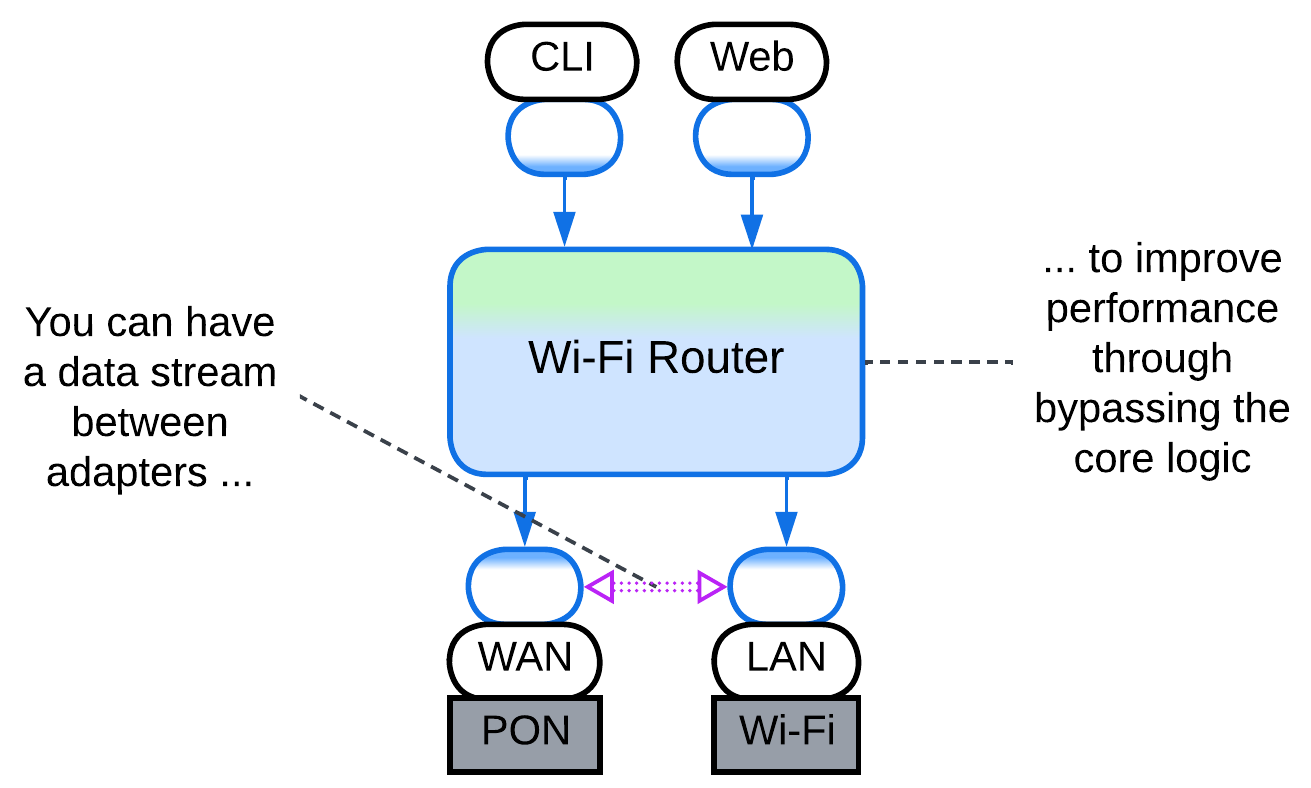
Occasionally, the system may benefit from direct communication between the adapters. However, that requires several of them to be compatible or polymorphic, in which case your Hexagonal Architecture may in fact be a kind of a shallow Hierarchy. Examples include a service which uses several databases which are kept in sync through Change Data Capture (CDC) or a telephony gateway that interconnects various kinds of voice devices.
Dependencies#
Each adapter breaks the dependency between the core that contains business logic and an adapted component. This makes all the system’s components mutually independent – and easily interchangeable and evolvable – except for the adapters themselves, which are small enough to be rewritten as need arises.
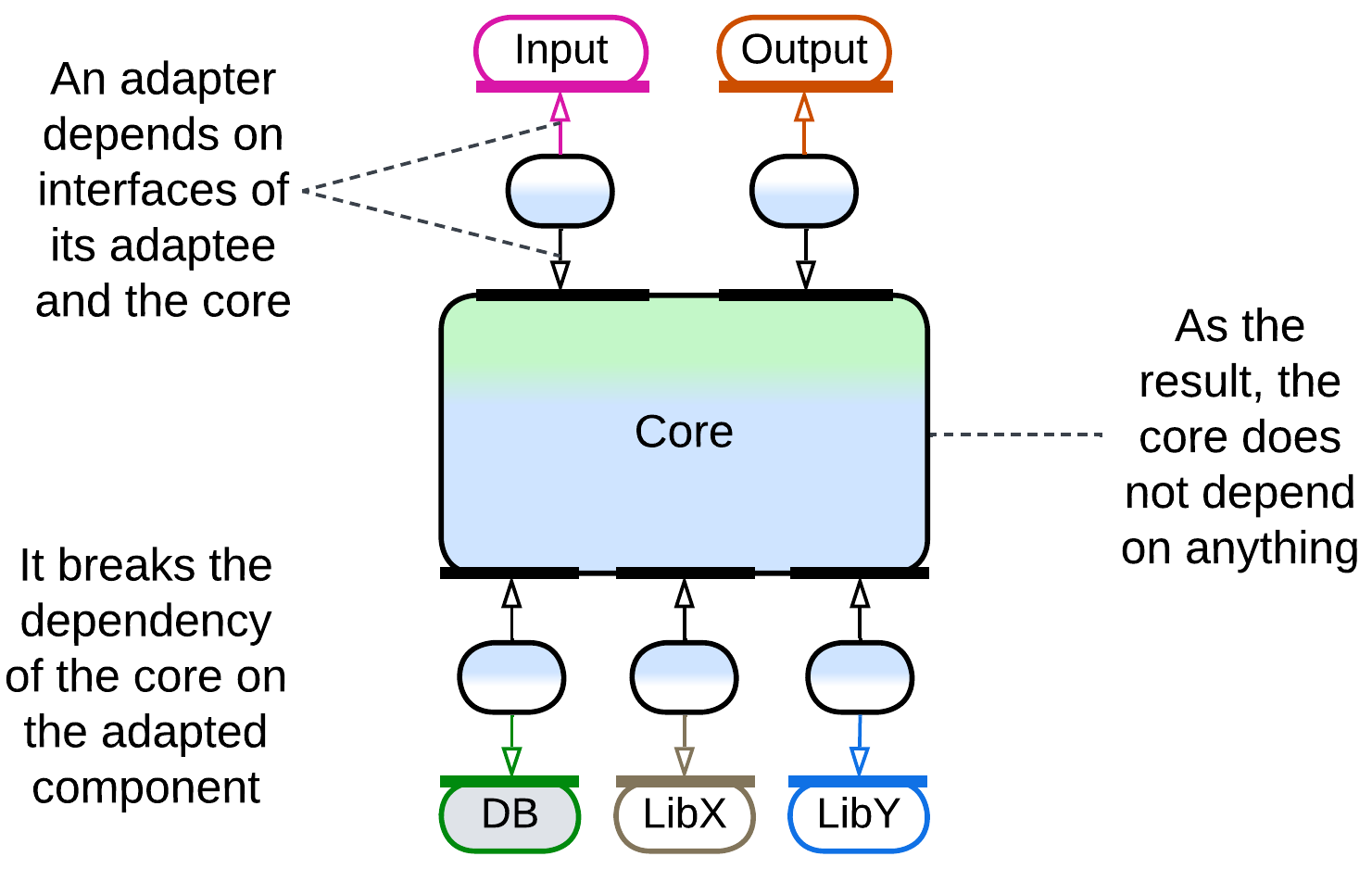
Still, there is a hidden pitfall of designing a leaky abstraction – an interface that looks generic but whose contract matches that of the component it encapsulates, making it much harder than expected to change the external component’s vendor.
Applicability#
Hexagonal Architecture benefits:
- Medium-sized or larger components. The programmers don’t need to learn details of external technologies and may concentrate on the business logic instead. The code of the core becomes smaller as all the details of managing the external components are moved into their adapters.
- Cross-platform development. The core is naturally cross-platform as it does not depend on any (platform-specific) libraries or frameworks.
- Long-lived products. Technologies come and go, your product remains. Always be ready to change the technologies it uses.
- Unfamiliar domain. You don’t know how much load you’ll need your database to support. You don’t know if the library which you have selected is stable enough for your needs. Be prepared to replace vendors even after the public release of your product.
- Automated testing. Stubs and mocks are great for reducing load on test servers. And stubs for the SPIs which you wrote yourself are as easy as a pie.
- Zero bug tolerance. SPIs allow for event replay. If your business logic is deterministic, you can reproduce your user’s bugs in your office.
Hexagonal Architecture is not good for:
- Small components. If there is little business logic, there is not much to protect, while the overhead of defining SPIs and writing adapters for them is high compared to the total development time.
- Write-and-forget projects. You don’t want to waste your time on long-term survivability of your code.
- Quick start. You need to show the results right now. No time for good architecture.
- Low latency. The adapters slow down communication. This is somewhat alleviated by creating direct communication channels between the adapters to bypass the core.
Relations#
Hexagonal Architecture:
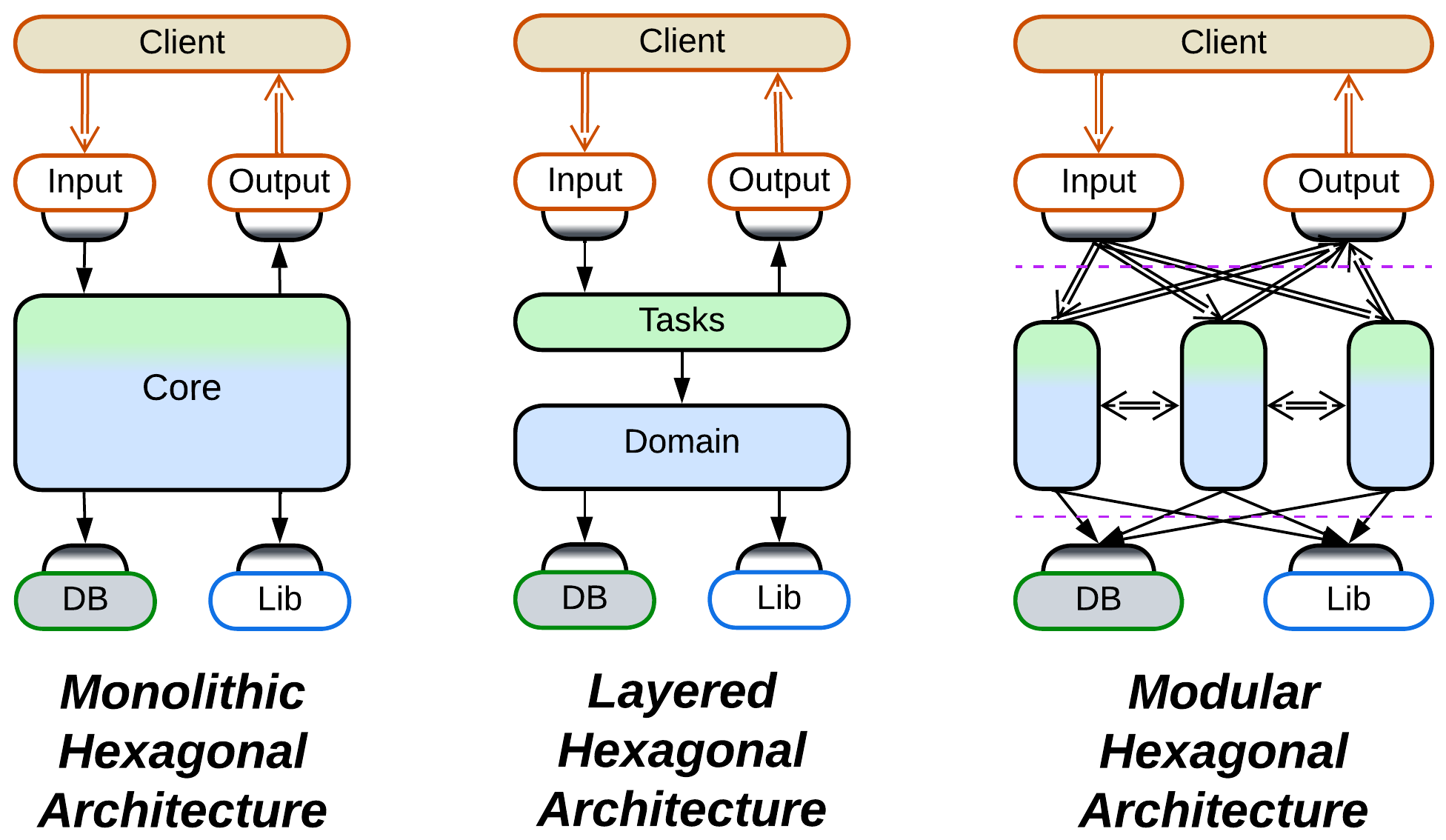
- Is a kind of Plugins.
- May be a shallow Hierarchy.
- Implements Monolith or Layers.
- Extends Monolith, Layers, or Services with one or two layers of Adapters.
- The MVC family of patterns is also derived from Pipeline.
Variants by placement of adapters#
There is a variation in a distributed or asynchronous Hexagonal Architecture regarding the deployment of Adapters, which may reside with the components they adapt or stay adjacent to the core:
Adapters on the external component side#
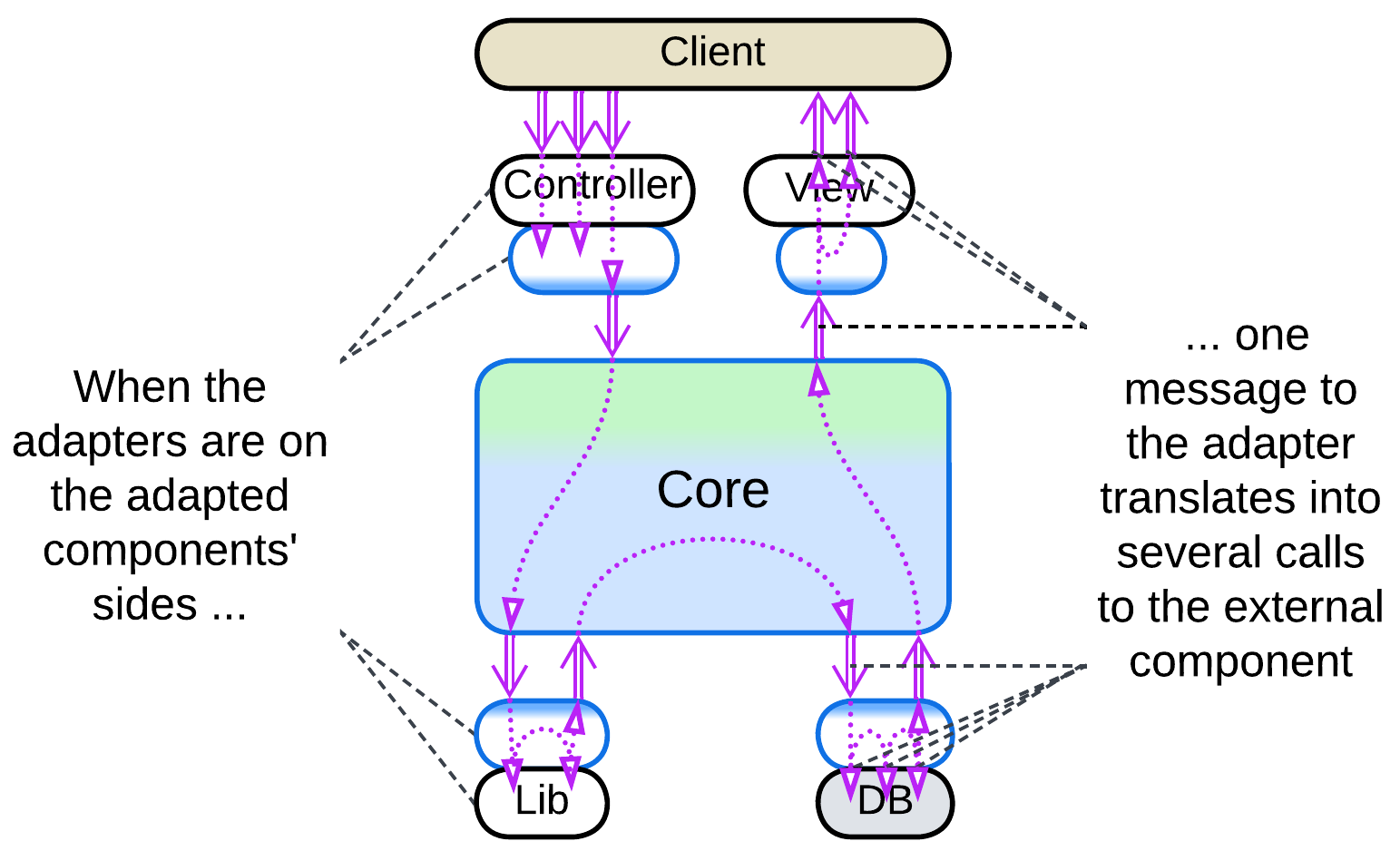
If your team owns the component adapted, the adapter may be placed next to it. That usually makes sense because a single domain message (designed in the terms of your business logic) tends to unroll into a series of calls to an external component. The fewer messages you send, the faster your system is.
Adapters on the core side#
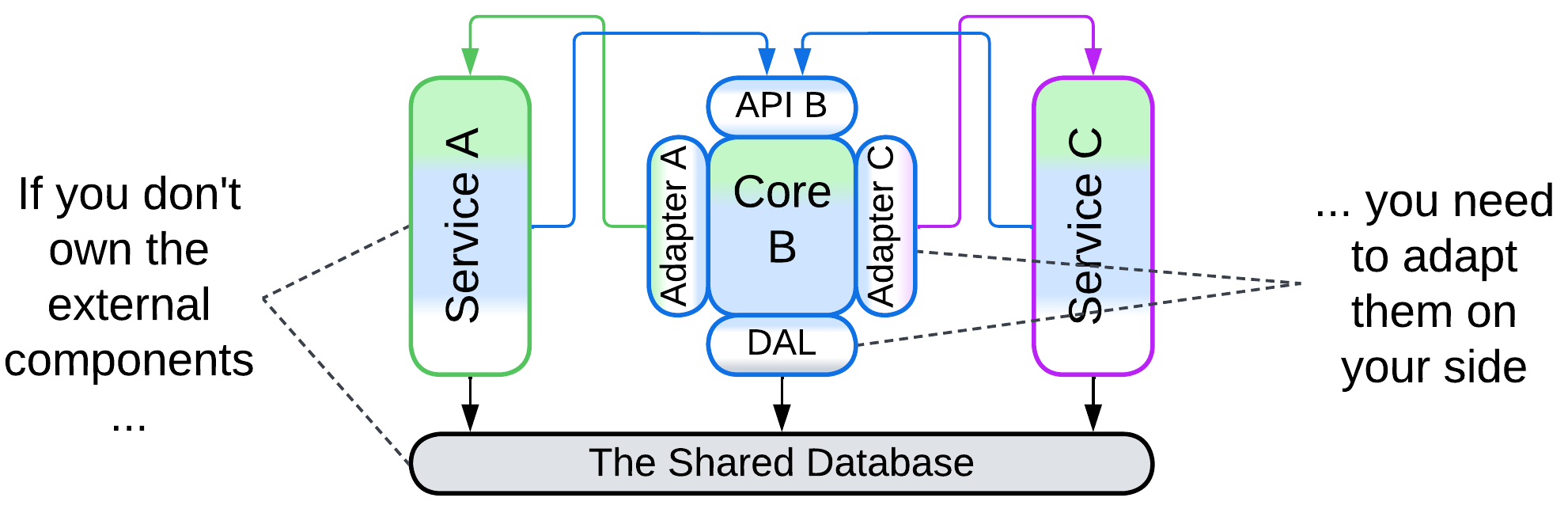
Sometimes you need to adapt an external service which you don’t control. In that case the only real option is to place its adapter together with your core logic. For a monolithic core (Ports and Adapters) the adapters may run in the core’s process as ordinary modules. A distributed core (Cell) requires the adapters to be stand-alone components, which however can be co-located and co-deployed with the core as Sidecars.
Variants by encapsulation#
In most cases a component or subsystem is involved in two kinds of communication:
- Input/output from clients, users, or network devices which we draw on the upper side of diagrams. These events initiate the application’s use cases thus they are called primary or driving.
- The activities and calls initiated by the component itself while executing a use case. They usually target the infrastructure or external services, are called secondary or driven, and are drawn on the lower side.
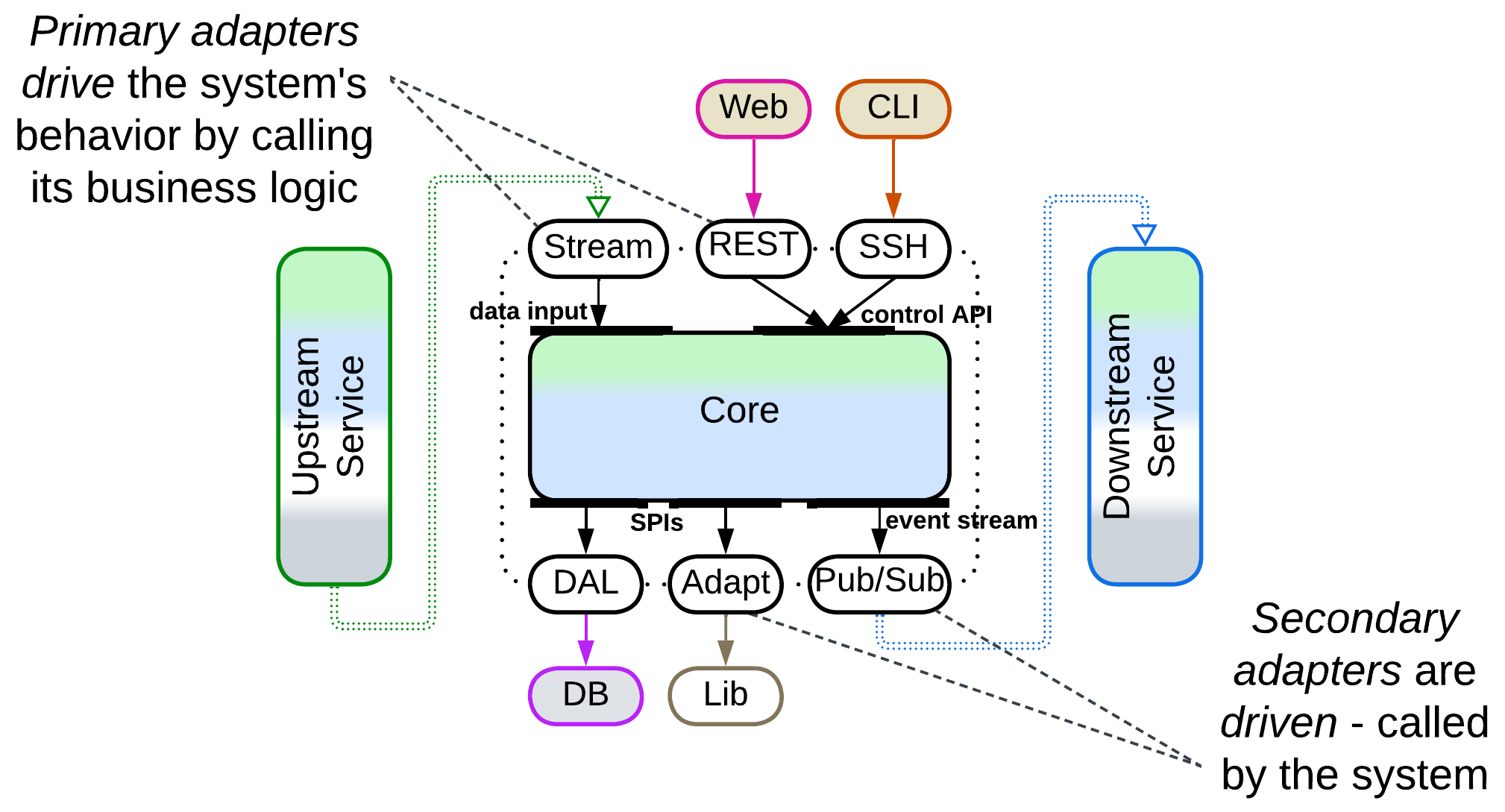
We can protect a component from its environment by inserting Adapters into its primary, secondary, or both communication pathways:
Upper half: Separated Presentation, Open Host Service#
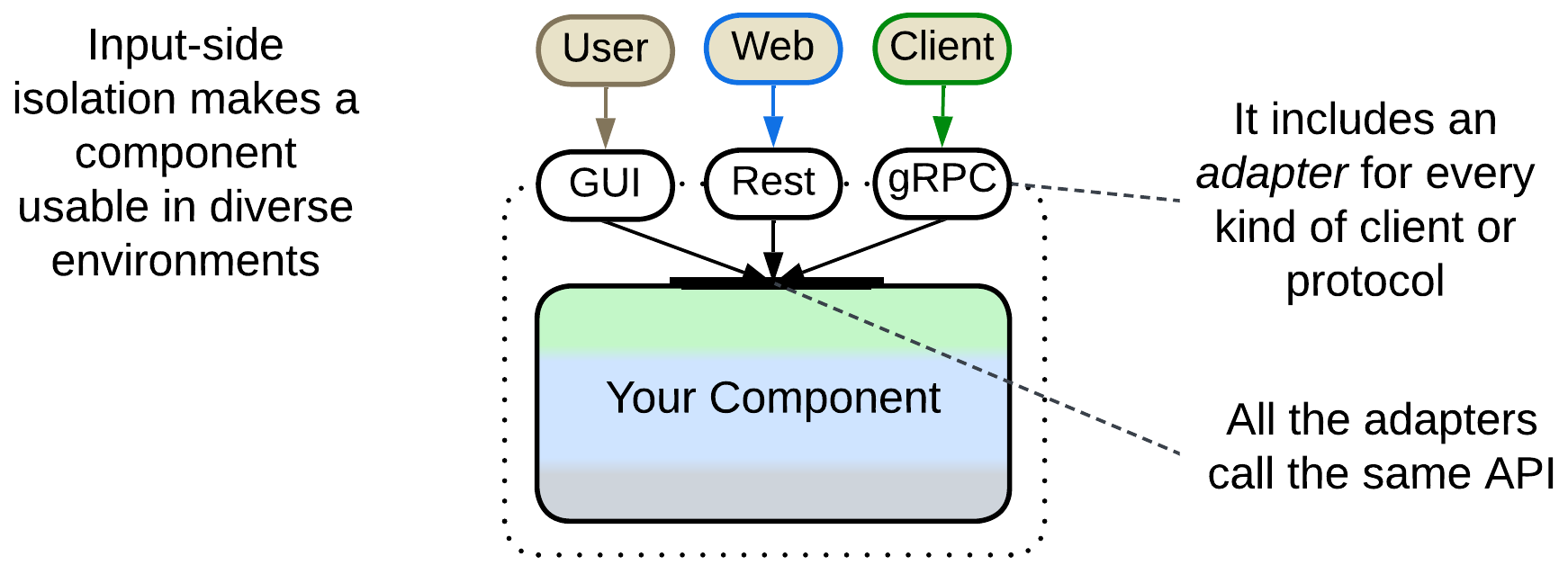
Isolation on the input (primary, driving) side is achieved by designing an Application Programming Interface (API) that provides access to your component’s use cases which your software exists to implement and writing adapters that translate your API into something convenient for every kind of communication used by your clients. For example, you may need a desktop GUI, mobile GUI, CLI, web application (REST), and customer (JSON or gRPC) adapters all of which are built on top of your component’s API.
Input side isolation allows for your system to be used in different environments and roles and enables automated testing of its business logic without hard-to-support GUI tests.
Separated Presentation protects business logic (model) from a dependency on the Presentation Layer [DDD] (interactions with the system’s user via a window, command line, or web page). There is a great variety of such patterns, commonly known as Model-View-Controller (MVC) alternatives, which make three structurally distinct groups:
- Bidirectional flow – the view (user-facing component) both receives input and produces output, and there is often an extra adapter between it and the main system, resulting in Layers. These patterns make the Model-View-Presenter (MVP) family.
- Unidirectional flow – the controller receives input while the view only produces output, forming a kind of Pipeline. Such patterns are associated with Model-View-Controller (MVC).
- Hierarchical patterns with multiple models, discussed in the Hierarchy chapter.
Open Host Service [DDD] is an enterprise pattern about providing functionality for use by other components (hence the name) through publishing a stable interface, known as a Published Language [DDD]. As the subject service should be able to change, and as its clients may differ in their needs, requiring multiple Published Languages, an Open Host Service usually involves an Adapter for every Published Language it provides – just like Separated Presentation does for supported UIs.
Lower half: Pedestal, Abstraction Layer, Anticorruption Layer#
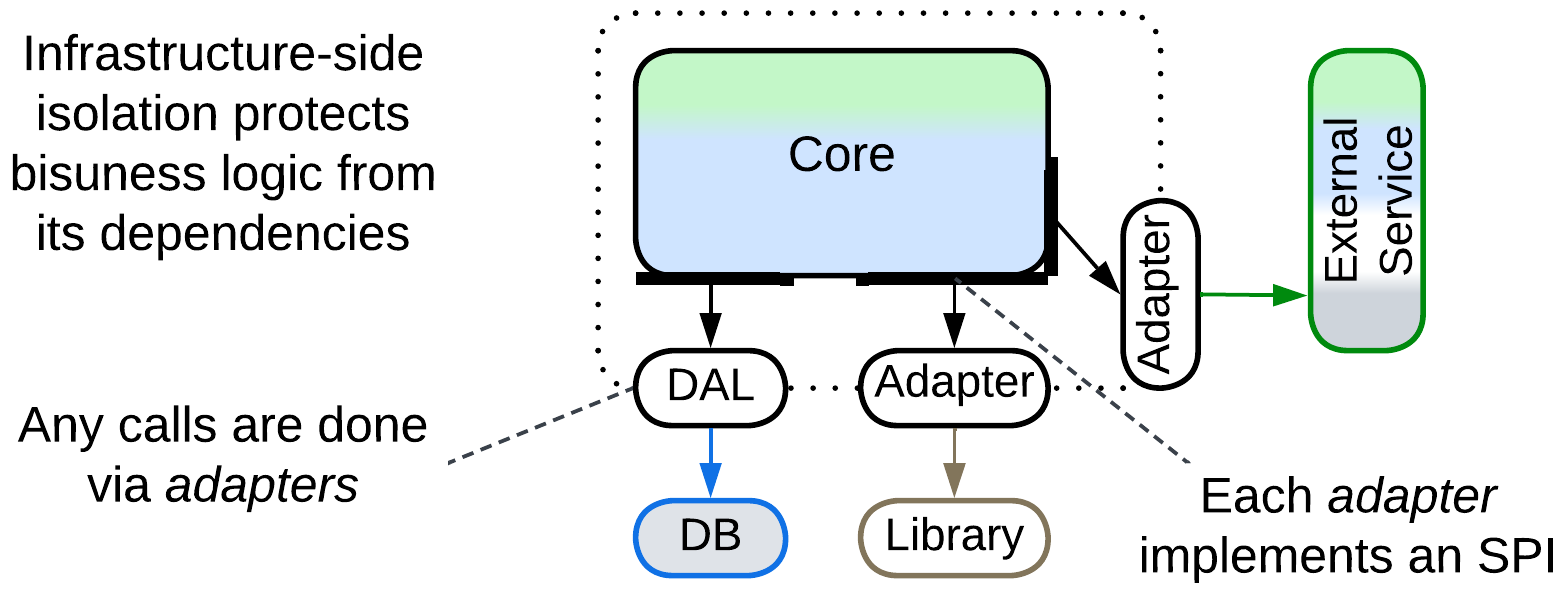
In many cases you need to protect your component from its dependencies. If the bulk of your code depends on a certain external service provider or component, you face a major risk, called vendor lock-in, of that provider going out of business, being acquired and killed by a larger company, or greatly increasing the price of its services. Therefore you better define a Service Provider Interface (SPI) in terms of your business logic and write an Adapter between it and the external provider’s API. This way you will be able to change the external provider by merely rewriting the adapter. It will also be easy to upgrade to new versions of the provider’s API. The set of adapters to the services used by a component is called Anticorruption Layer [DDD] because it protects the component from any external changes.
There is a similar situation in embedded and systems programming where software faces hardware. A hardware component is normally in production only for a few years before being replaced by a newer, and often incompatible, chip. You have to make sure that your business logic can run on any hardware that provides the functions it needs – therefore you write hardware-specific Drivers which adapt the target hardware’s interface to the expectations of your business logic. The drivers make an Hardware Abstraction Layer while the entire architecture is called a Pedestal.
Another common case is platform independence – you may need to run your code under different operating systems or cloud orchestrators, which requires an OS Abstraction Layer (OSAL) or a Platform Abstraction Layer (PAL). And you may even use a Database Abstraction Layer (DAL) to feel more secure.
The extra benefit of the isolation from infrastructure and external services by using secondary or driven adapters is the ability to run against test doubles – local stubs or mocks that replace an external dependency, saving testing time and money. They also allow for implementing business logic before the external services which it will use are chosen, and even replacing a service provider late in the project’s life cycle.
Full encapsulation: Ports and Adapters#
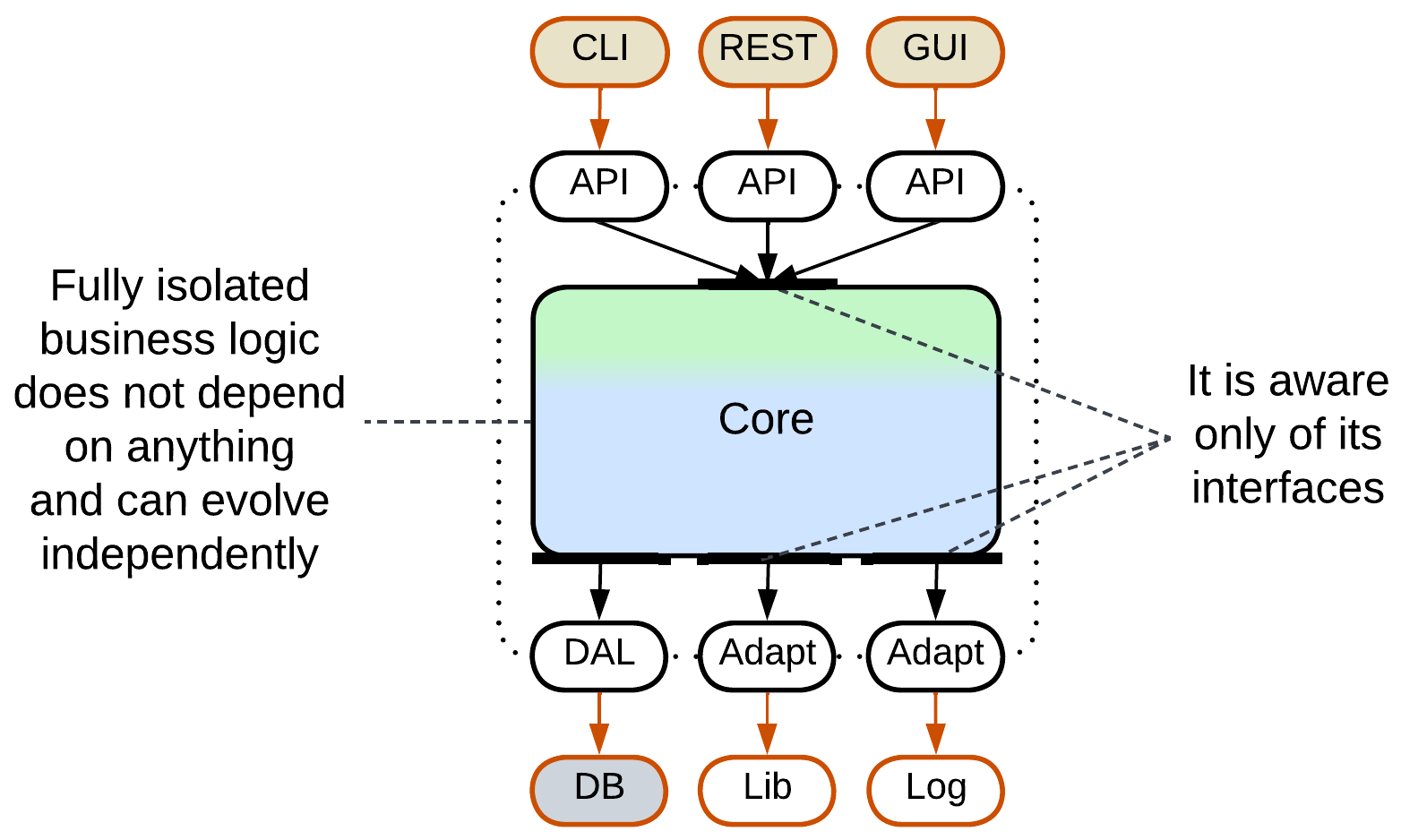
Complete isolation of business logic – when both driving and driven communication is mediated by adapters – not only reaps the benefits of both approaches described above but also simplifies the main codebase because the entire business logic is written in its own terms, called Ubiquitous Language [DDD]. It also lowers the cognitive complexity which its programmers face because they don’t need to learn any external technology, and allows for event replay to reproduce bugs (any reproducible bug is a dead bug) if the business logic is deterministic.
The pattern for full isolation of business logic is known as Ports and Adapters which is the original Hexagonal Architecture.
Examples#
Several patterns apply the principles of Hexagonal Architecture to different extents:
- The patterns of the MVP family add one or two layers of indirection between a GUI or web framework and the business logic.
- Those of the MVC family use separate adapters for input and output flows.
- Pedestal wraps each hardware component with a Driver.
- Ports and Adapters fully isolate the system’s business logic from any dependencies.
- There are a few related architectures with layered cores.
- Cell isolates a group of services from the rest of the system.
Model-View-Presenter (MVP), Model-View-Adapter (MVA), Model-View-ViewModel (MVVM), Model 1 (MVC1), Document-View#
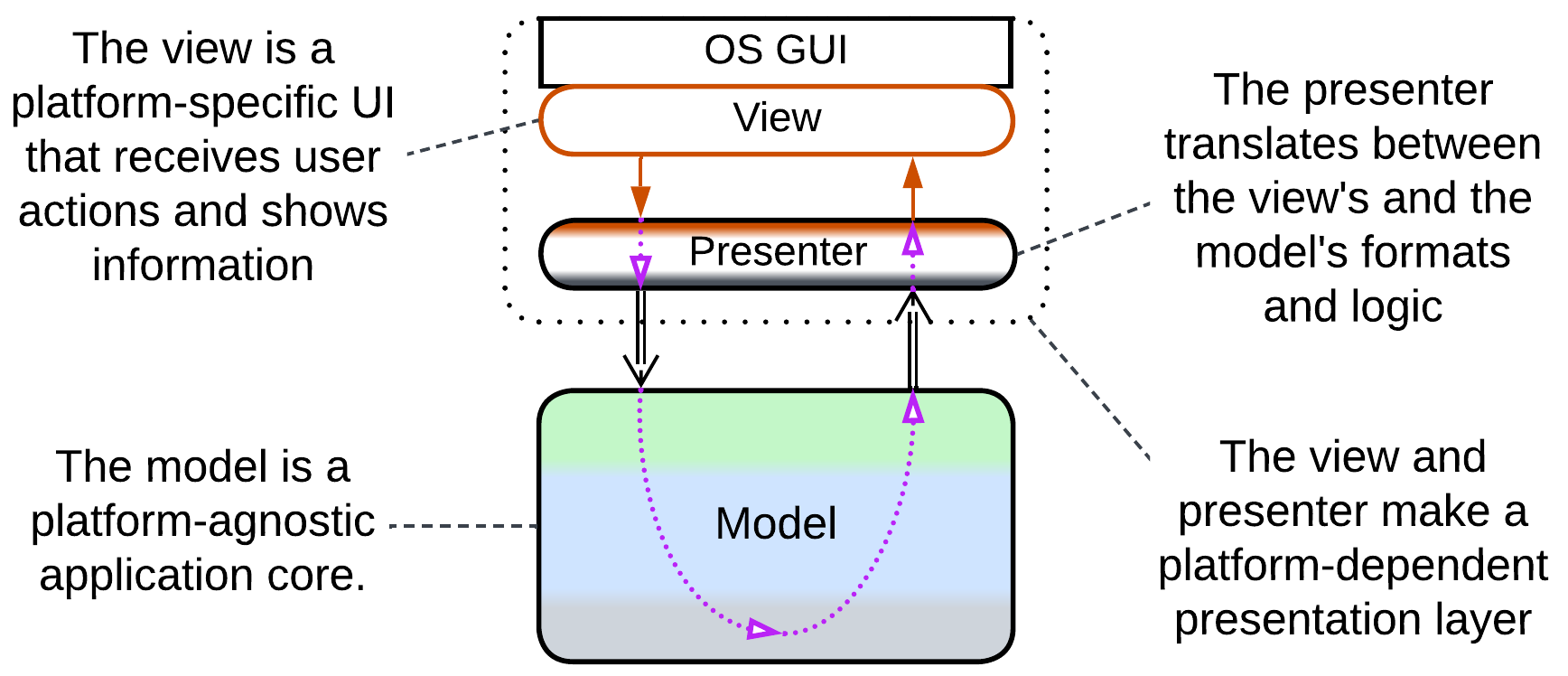
MVP-style patterns pass user input and output through one or more Presentation Layers. Each pattern includes:
- A view – the interface exposed to users. In Hexagonal Architecture’s terms it is an Adapter for the OS GUI framework.
- An optional intermediate layer that translates between the view and model, beneficial for when the internal representation of the domain in the model diverges from the way it is presented to users by the view. It is this component which differentiates the patterns, both in name and function.
- A model – the whole system’s business logic and infrastructure, now independent from the method of presentation (CLI, UI, or web).
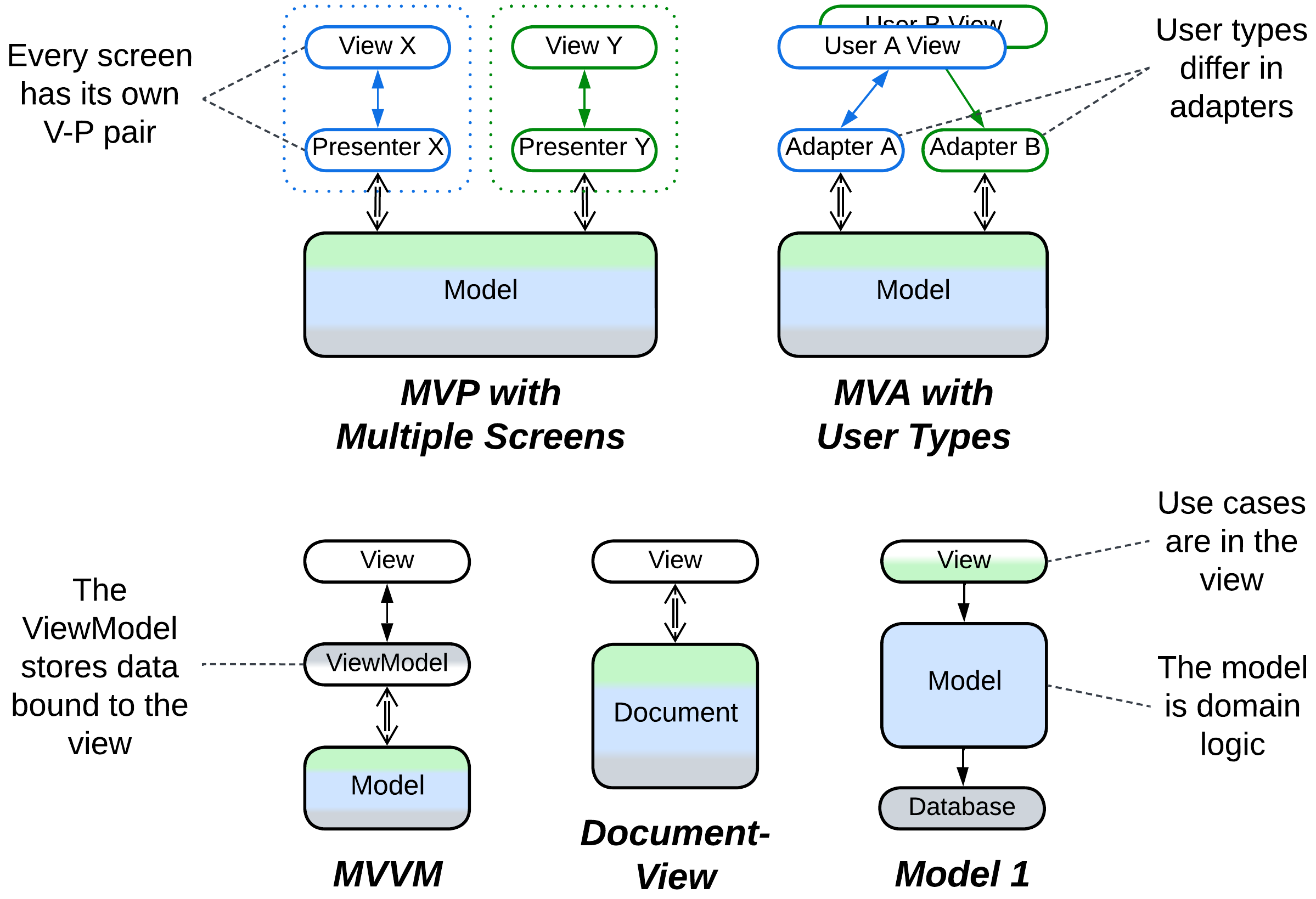
Document-View [POSA1] and Model 1 (MVC1) skip the intermediate layer and connect the view directly to the model (document). These are the simplest Separated Presentation patterns for UI and web applications, respectively.
In a Model-View-Presenter (MVP), the presenter (Supervising Controller) receives input from the view, interprets it as a call to one of the model’s methods, retrieves the call’s results, and shows them in the view, which is often completely dumb (Passive View). A complex system may feature multiple view-presenter pairs, one per UI screen.
A Model-View-Adapter (MVA) is quite similar to MVP, but it chooses the adapter on a per session basis while reusing the view. For example, an unauthorized user, a normal user, and an admin would access the model through different adapters which would show them only the data and actions available under their permissions.
A Model-View-ViewModel (MVVM) uses a stateful intermediary (ViewModel or Presentation Model) which resembles a Response Cache, Materialized View, Reporting Database, or the Read Model of CQRS – it stores all the data shown in the view in a form which is convenient for the view to bind to. Changes in the view are propagated to the ViewModel which translates them into requests to the underlying application (the true model). Changes in the model (both independent and resulting from user actions) are propagated to the ViewModel and, eventually, to the view.
All those patterns exploit modern OS or GUI frameworks’ widgets which handle and process mouse and keyboard input, thus removing the need for a separate (input) controller (see below).
Model-View-Controller (MVC), Action-Domain-Responder (ADR), Resource-Method-Representation (RMR), Model 2 (MVC2), Game Development Engine#
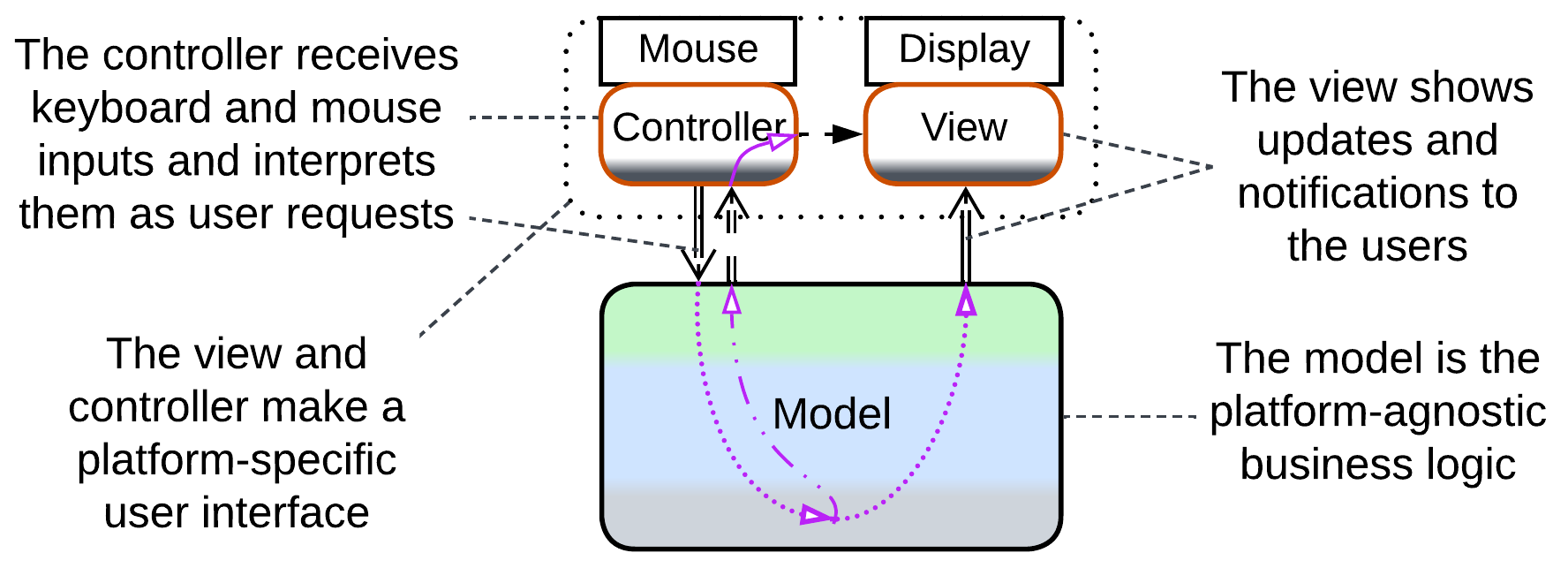
When your presentation’s input and output are of different natures (raw mouse movement vs 3D graphics in UI, HTTP requests vs HTML pages in websites), it makes sense to separate the Presentation Layer into dedicated components for input and output.
Model-View-Controller (MVC) [POSA1, POSA4] allows for cross-platform development of hand-crafted UI applications (which was necessary before universal UI frameworks emerged) by abstracting the system’s model (its main logic and data, the core of Hexagonal Architecture) from its user interface comprised of platform-specific controller (input) and view (output):
- The controller translates raw input into calls to the business-centric model’s API. It may also hide or lock widgets in the view when required by the input or if the model’s state changes.
- The model is the bulk of UI-agnostic code which executes the controller’s requests and notifies the view and, optionally, controller when its data changes.
- Upon receiving a notification, the view reads, transforms, and presents to the user the subset of the model’s data which it covers.
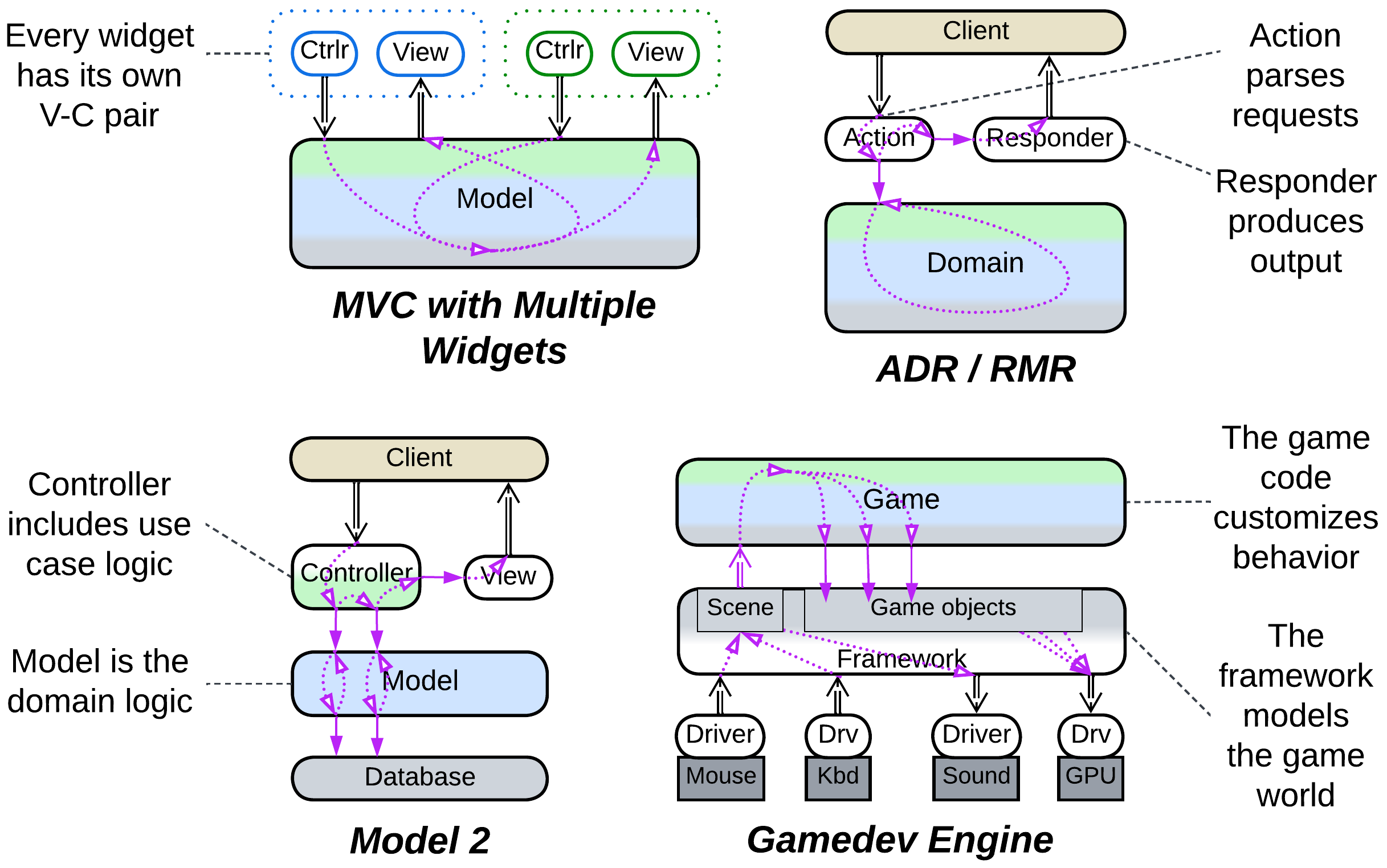
Each widget on the screen may have its own model-view pair. The absence of an intermediate layer between the view and model makes the view heavyweight as it has to translate the model’s data format into something presentable to users – the flaw addressed by the 3-layered MVP patterns discussed above.
Both Action-Domain-Responder (ADR) and Resource-Method-Representation (RMR) are web layer patterns. An action (method) receives a request, calls into a domain (resource) to make changes and retrieve data, and brings the results to a responder (representation) which prepares the return message or web page. ADR is technology-agnostic while RMR is HTTP-centric.
Model 2 (MVC2) is a similar pattern from the Java world with integration logic implemented in the controller.
A game development engine creates a higher-level abstraction over input from mouse / keyboard / joystick and output to sound card and GPU while more powerful engines may also model physics and character interactions. This role is quite similar to what the original MVC did, with a couple of differences:
- Games often have to deal with the low-level and very chatty interfaces of hardware components, thus the input and output are at the bottom side of the system diagram.
- The framework itself makes a cohesive layer, becoming a kind of Microkernel.
Another difference is that while MVC provides for changing target platforms by rewriting its minor components (the view and controller), you are very unlikely to change your game framework – instead, it is the framework itself that makes all the platforms look identical to your code.
Pedestal#
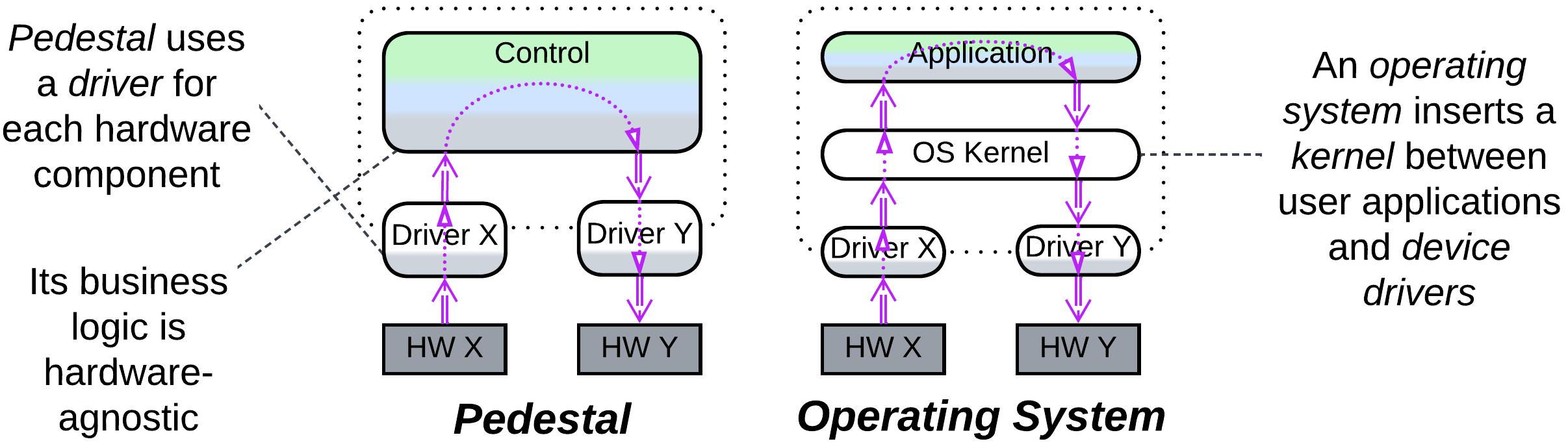
Pedestal is named after the shape of its diagram and describes a system that operates multiple hardware components. On one hand, software takes years to write and stabilize. On the other hand, there are many versions and even vendors for each kind of hardware component, and they change over years. Therefore, the bulk of the software that contains the system logic (called control) is decoupled from the hardware which it manages through the use of hardware-specific Drivers. As a result, changes in hardware require updates only to the matching drivers, the business logic remaining intact.
A similar pattern is in use with OS kernels, adjusted for the fact that the business logic now resides in user applications, the kernel acting as an extra layer of indirection.
Ports and Adapters, Hexagonal Architecture#
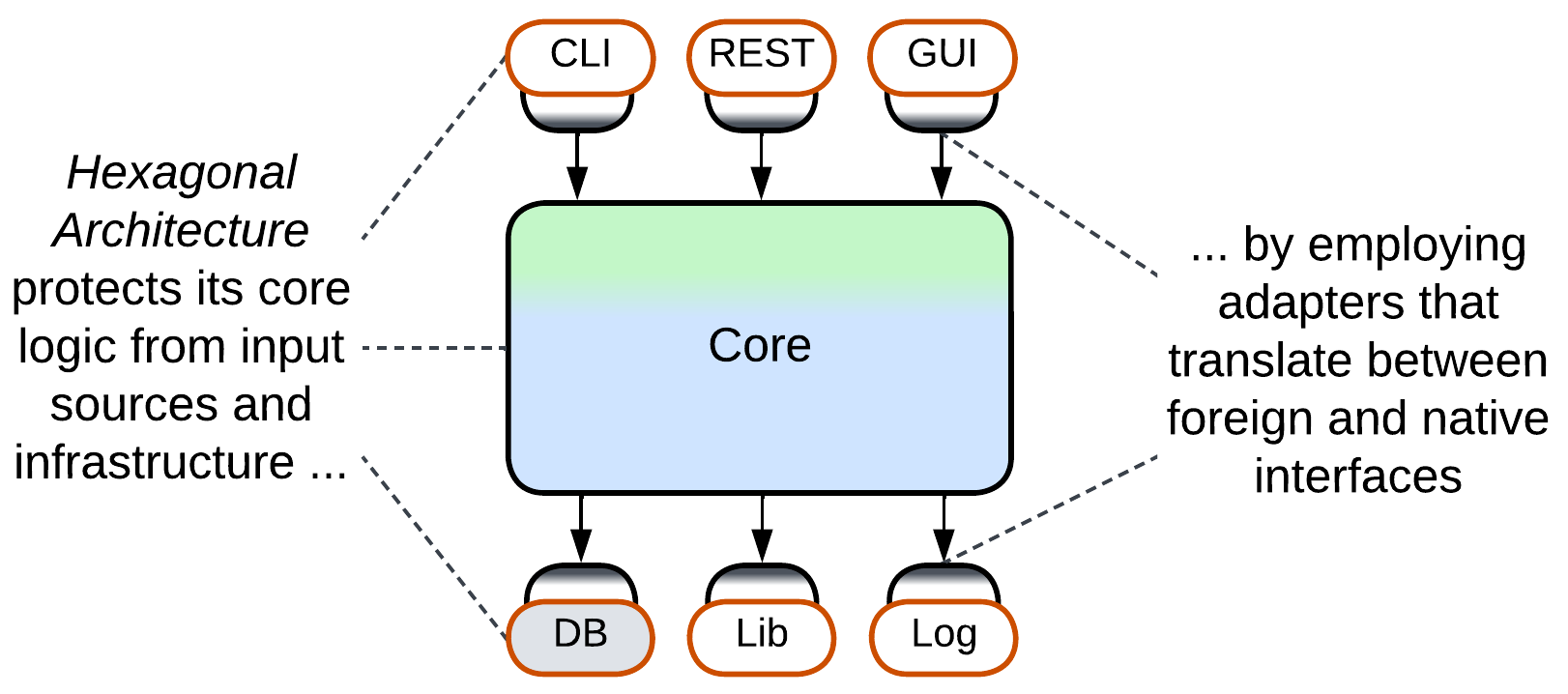
Ports and Adapters – the original Hexagonal Architecture – provides full isolation for its business logic (core) by injecting Adapters in all its communication pathways. As a result, the core depends only on the interfaces, called ports (hence the name of the pattern), which it defines, with the benefits discussed earlier in this chapter.
Just like MVC it is based on, Ports and Adapters does not care about the contents or structure of its core – it is all about isolating the core from its environment. The core may have Layers or Modules, or even Plugins inside, but this pattern has nothing to say about them.
DDD-Style Hexagonal Architecture, Onion Architecture, Clean Architecture#
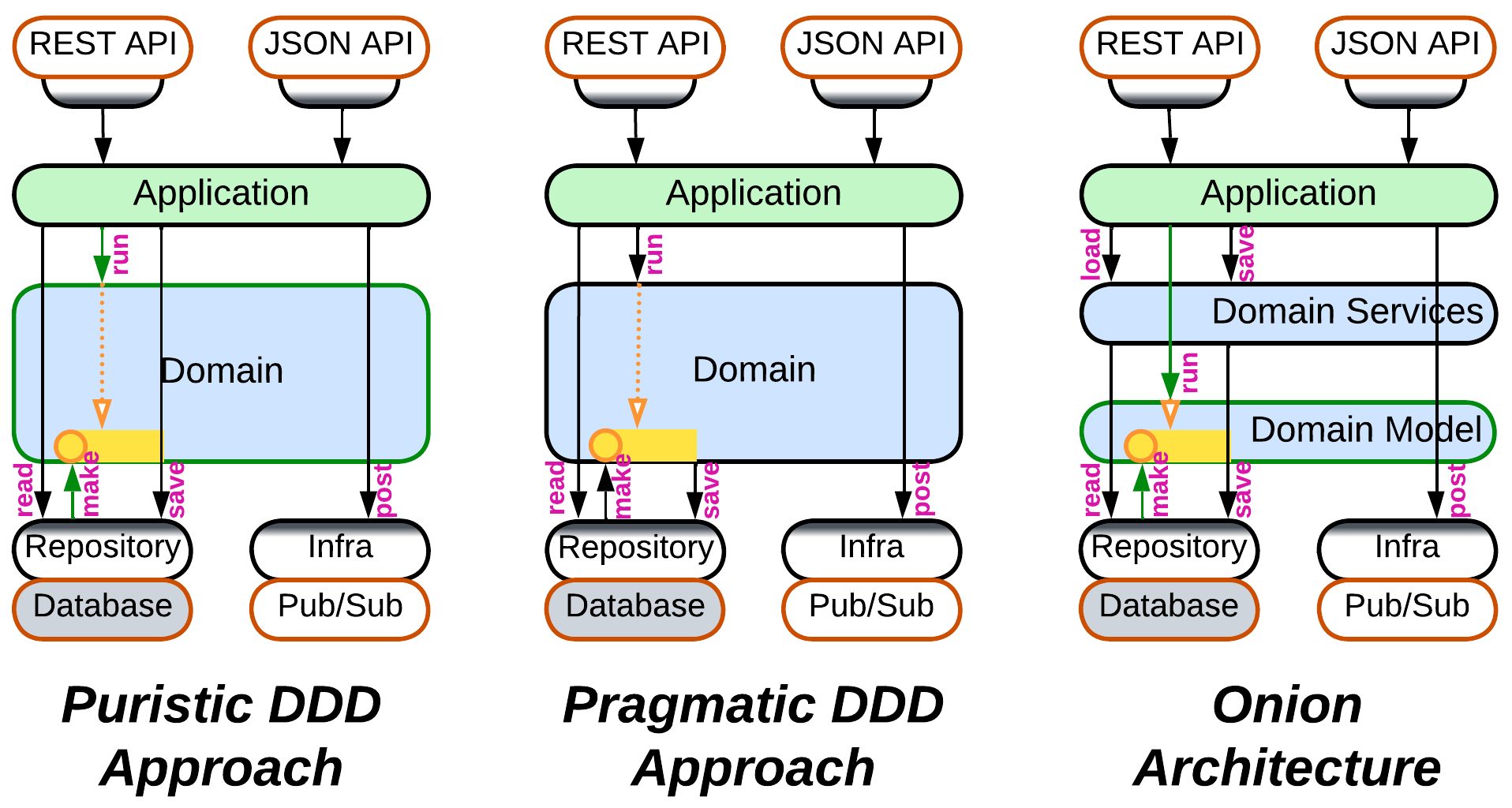
As Hexagonal Architecture built upon the Domain-Driven Design’s (DDD) idea of isolating business logic with Adapters (see the Anticorruption Layer and Open Host Service patterns), it was quickly integrated back into DDD [LDDD]. However, as Ports and Adapters appeared later than the original DDD book, namely [DDD], there is no universal agreement on how this architecture should work:
- The cleanest way is for the domain layer to have nothing to do with the database – with this approach the application asks the repository (the database adapter) to create aggregates (domain objects), then executes its business actions on the aggregates, and tells the repository to save the changed aggregates back to the database.
- Others say that in practice the logic inside an aggregate may have to read additional information from the database or even depend on the results of persisting parts of the aggregate. Thus it is the aggregate, not the application, which should save its changes, and the logic of accessing the database leaks into the domain layer.
- Onion Architecture (see the original article for the meaning of the name) – one of early developments of Hexagonal Architecture and DDD – always splits the domain layer into a domain model and domain services. The domain model layer contains classes with business data and business logic, which are loaded and saved by the mostly stateless domain services layer just above it. And the upper application services layer drives use cases by calling into both domain services and the domain model.
- There is also Clean Architecture which seems to generalize the approaches above without delving into practical details – thus the way it saves its aggregates remains a mystery.
Cell, Cluster, Domain#
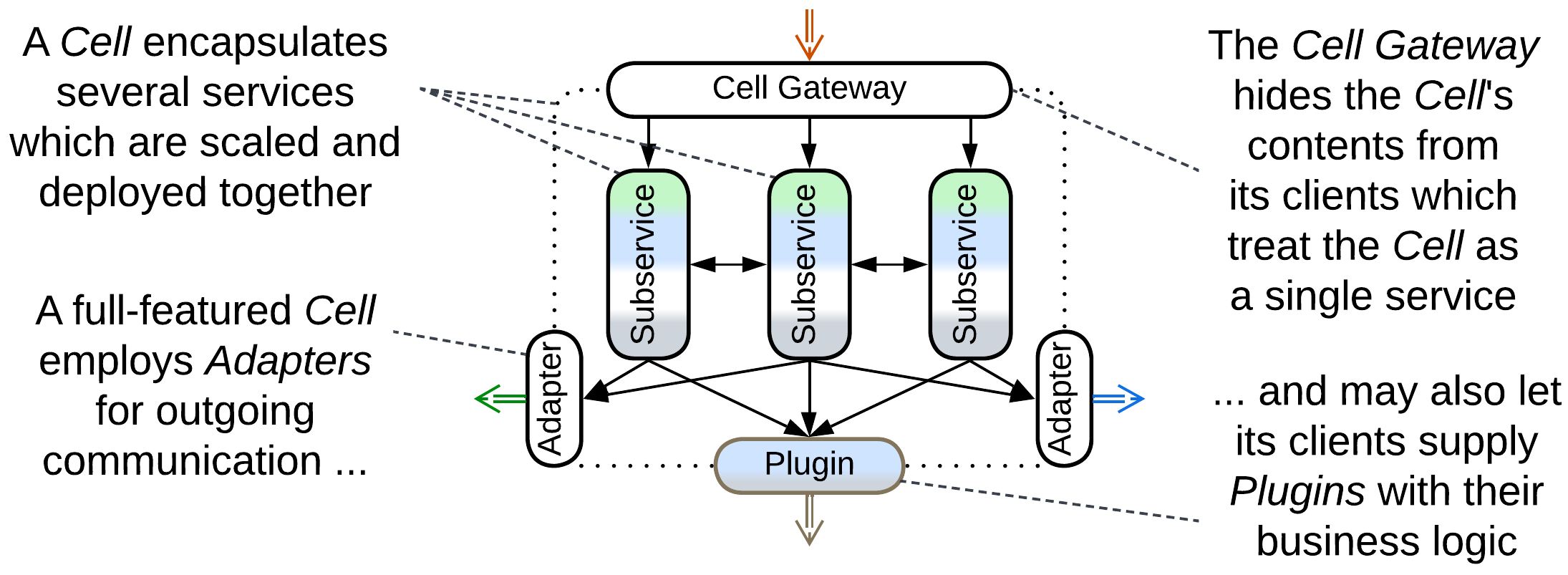
A Cell (WSO2 name), Cluster [DEDS], or Domain (Uber’s name) is an encapsulated cluster of services which implements a subdomain and is usually deployed as a single unit. It is modeled after a living cell whose contents are isolated with a membrane. As a rule of thumb [DEDS], the communication inside a Cell is synchronous, allowing for complex orchestrated use cases that involve the tightly coupled Cell components. Contrariwise, cells are usually loosely coupled among themselves and the communications between them tend to be asynchronous (choreography).
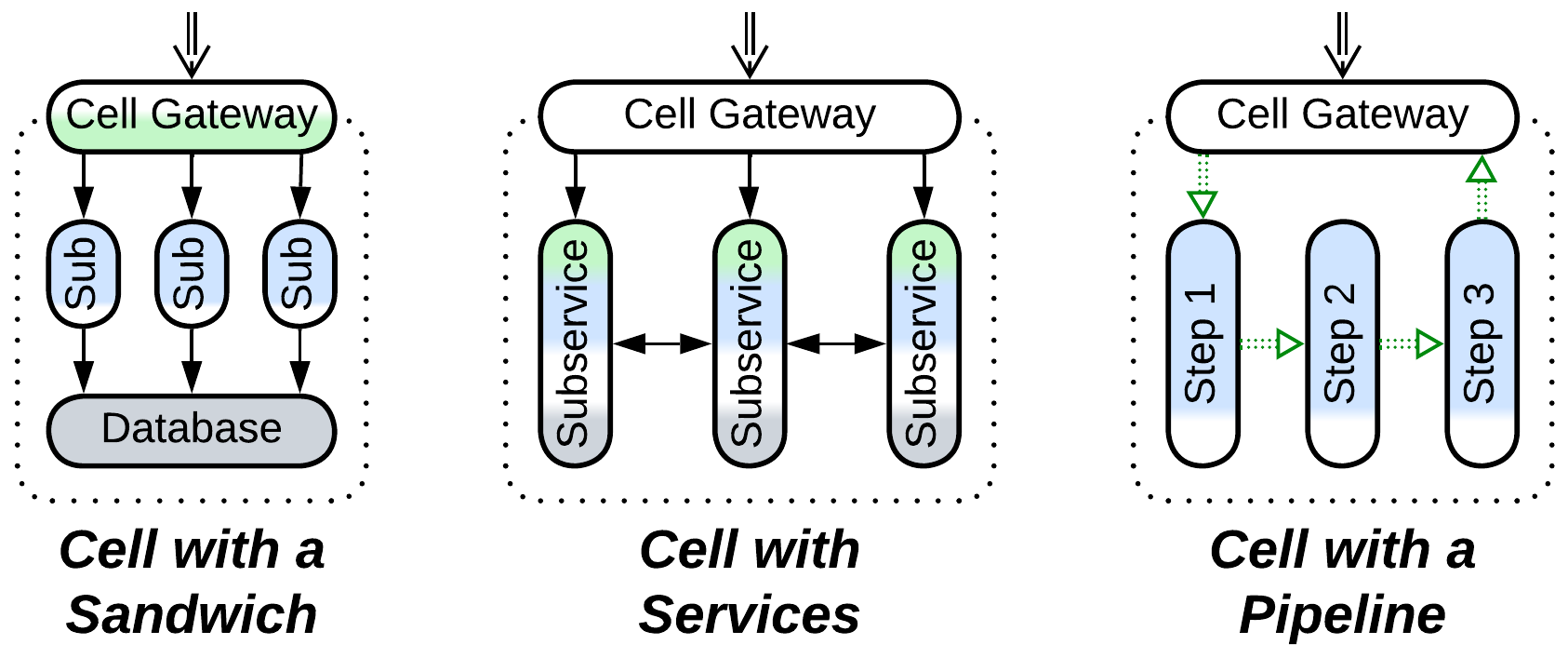
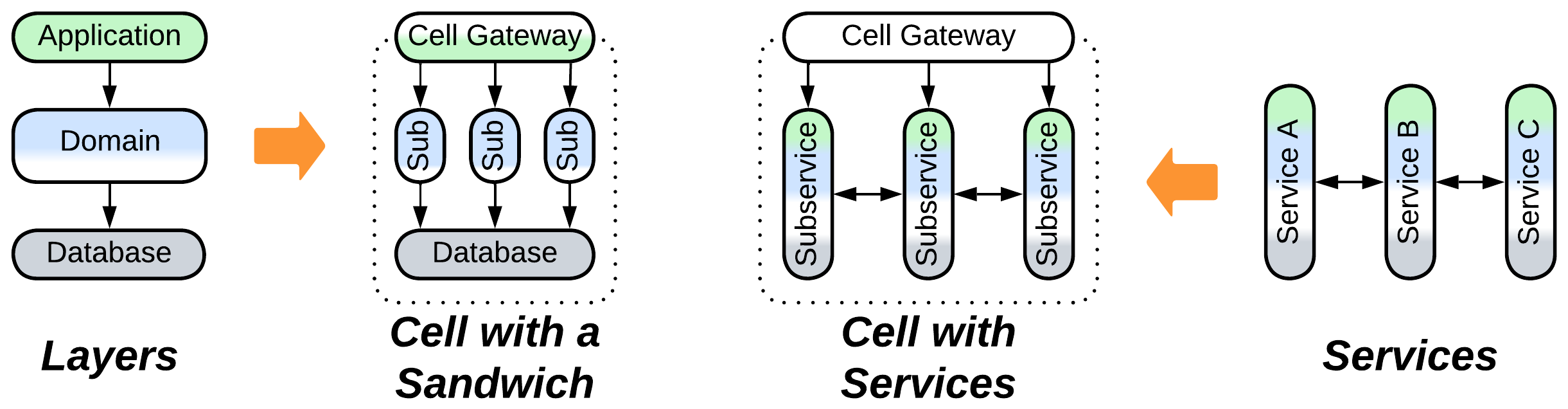
A Cell may naturally emerge when a subdomain service becomes too large for comfortable development, which usually means that at least its domain layer (already limited to a single subdomain) is to be subdivided into sub-subdomain components. If other layers remain intact, this leads to a Sandwich, otherwise the result is a subsystem of Services or a Pipeline.
Another way a Cell can arise is when architects have overcommitted themselves to Microservices, gradually introducing hundreds of them and turning their project into a Microservice Hell. Now they need to group their services to:
- Have a clear high-level picture of what is going on in the system.
- Cut accidental dependencies between their services and the teams behind them.
- Improve latency by co-locating the services that interact intensely.
In the simplest implementation, the cell’s contents are hidden from its clients by a Cell Gateway which acts as an Open Host Service, allowing for anything inside the cell to be changed at will with no effect on the outside world.
Better developed Cells employ Adapters for outgoing requests to build an Anticorruption Layer that protects the cell’s contents from changes in its environment. Please note that, unlike in Ports and Adapters, there is no Adapter for the Cell’s database(s) as they are inside the Cell’s perimeter.
Another improvement, popularized by Uber’s Domains, is the use of Ambassador Plugins which run pieces of business logic that belong to other cells inside a host cell. That both avoids slow intercell calls and boosts the system’s fault tolerance as each cell can now operate independently.
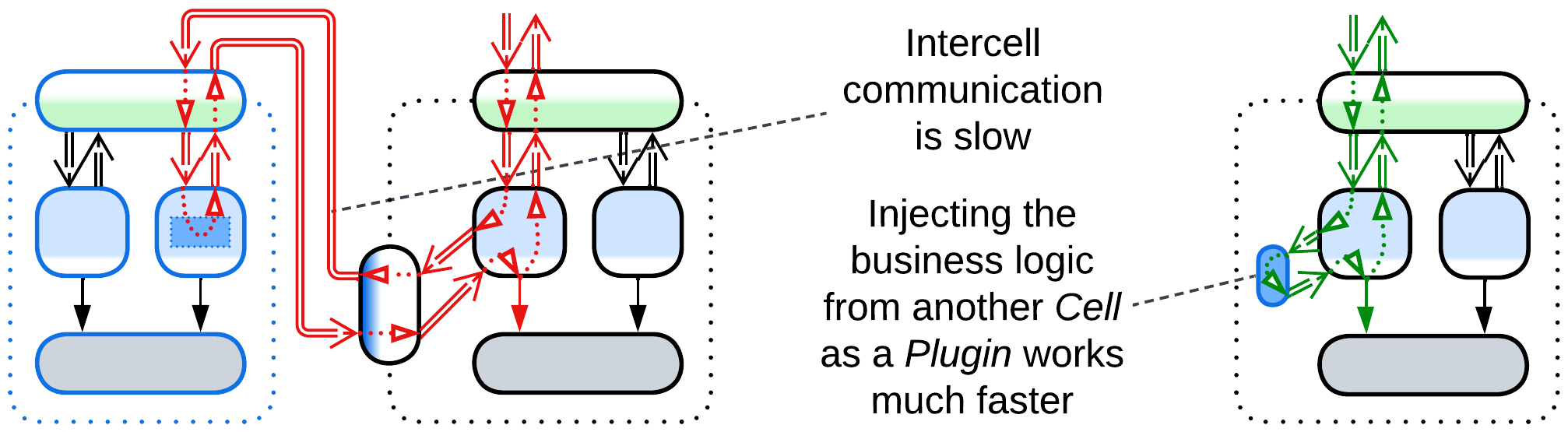
Cells facilitate recursive decomposition by subdomain. They are the building blocks for the following patterns:
- Cell-Based Architecture which is hierarchical Services.
- Domain-Oriented Microservice Architecture which is a SOA boosted by Ambassador Plugins.
Summary#
Hexagonal Architecture isolates the component’s business logic from its external dependencies by inserting adapters between them. It protects from vendor lock-in and allows for late changes of third-party components but requires all the APIs and SPIs to be designed before programming can start and often hinders performance optimizations.